
Quick answer
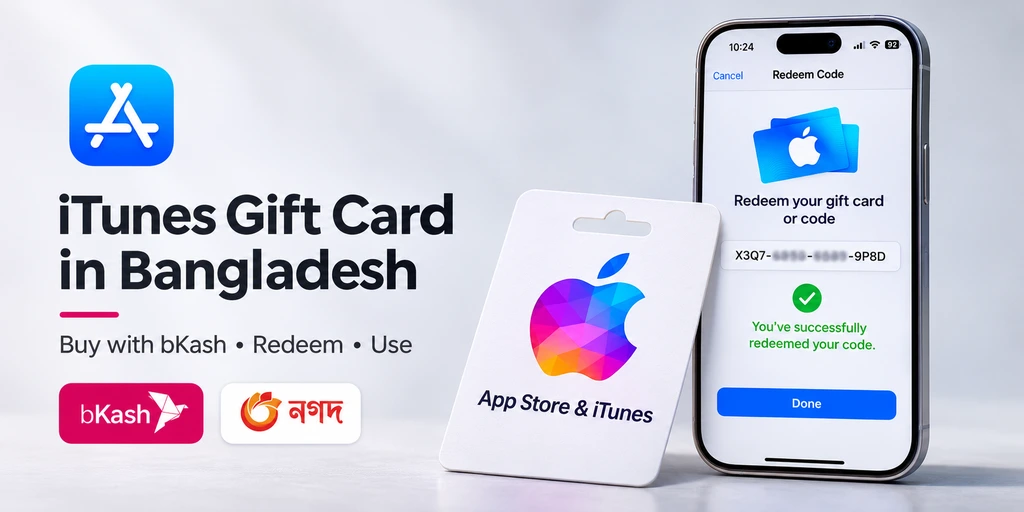
Bangladesh has no App Store, Apple Music or iCloud+ storefront, so there is no Bangladesh App Store to redeem a card in. To buy an iTunes Gift Card in Bangladesh, buyers pay with bKash or Nagad for a US card and redeem it on a US-region Apple Account (Apple ID), because US cards only link to US accounts. Apple then charges that balance first for apps, in-app purchases and subscriptions like iCloud+ and Apple Music, and if it runs out, Apple tries your other payment methods or your account shows a negative balance.
This guide follows the whole journey: what the card is, what to check before you buy, how to buy and redeem it, how to check and spend your balance, and how to keep a subscription running.
What is an iTunes Gift Card now?
"iTunes Gift Card" is the name most people still search for. Apple's support pages name three cards that add money to your Apple Account balance: the Apple Gift Card, the App Store Card and the App Store & iTunes Gift Card (Apple Support). The Apple Store Gift Card is a different card.
| Card | Redeem in the App Store? | Notes |
|---|---|---|
| Apple Gift Card | Yes | Can also buy Apple products where Apple Gift Card is available |
| App Store & iTunes Gift Card / App Store Card | Yes | Adds money to your Apple Account balance |
| Apple Store Gift Card (gray, white, silver or gold) | No | Only for the Apple Online Store and Apple Store shops (Apple Support) |
Does Bangladesh have its own App Store or Apple Gift Card?
No. Bangladesh isn't on Apple's list of countries and regions where the App Store, Apple Music and iCloud+ are available (Availability of Apple Media Services). So there is no Bangladesh storefront to redeem a card in.
Buyers in Bangladesh use a US-region Apple Account (Apple ID) with a US iTunes Gift Card. Apple's terms say gift cards bought in the United States can only be linked to a US account and used for US purchases (Apple gift card terms). That is why the card's region and your account's region must match.
Cards from other countries follow the same rule: Apple says a gift card works only in the country or region where it was bought (Apple Support). See Apple gift cards for other regions. Already bought a card that doesn't match? Here's how to fix a region mismatch.
Before you buy: a 5-point checklist
✓ Your Apple Account country is United States. The Country/Region setting is under Settings → [your name] → Media & Purchases (Apple Support).
✓ What you want to pay for accepts Apple balance. Some subscriptions, and starting AppleCare+, can't be paid with balance.
✓ It's the right card. You need an Apple Gift Card or App Store & iTunes Gift Card, not an Apple Store Gift Card.
✓ You know a card may still be asked for. Apple says some purchases may need a credit card on file, even when you pay with balance.
✓ You'll keep the code private. Apple warns never to share a code with someone you don't know.
How to buy an iTunes Gift Card in Bangladesh
You can buy online and pay in taka with a mobile wallet. On Gift Cards Zone BD it takes four steps:
- Open the page to buy an iTunes Gift Card (USA) with bKash and choose a card value.
- Enter the email address where you want the code.
- Pay with bKash, Nagad, Rocket, Upay or EPS.
- Copy your code from the website or your email. Some values are marked Manual Delivery on the product page and can take longer.
New to the site? First create your Gift Cards Zone BD account, then follow our step-by-step ordering guide. You can also pay with GCZBD Points.
How to redeem your iTunes Gift Card
Redeeming adds the card's value to your Apple Account balance. The steps below follow Apple's guide published September 21, 2026 (Apple Support). Menu names can change with new iOS and macOS versions.
Video: Tech Shibly, sponsored by Gift Cards Zone BD. The app screens may look slightly different on newer iOS versions; the steps below follow Apple's latest guide.
On iPhone or iPad
- Open the App Store.
- Tap your photo, initials or the My Account button.
- Tap Redeem Code.
- Tap Use Camera, or Enter Code Manually.
- Tap Redeem.
In some countries and regions, Apple also lets you redeem in the Wallet app. It isn't offered everywhere.
On a Mac
- Open the App Store.
- Click your name in the sidebar, or click Sign In and sign in.
- Click Redeem Code.
- Click Use Camera or Enter Code Manually, then follow the steps on screen.
On a Windows PC
- Open the Apple Music app or the Apple TV app.
- Click your name at the bottom of the sidebar. Sign in first if asked.
- Click Redeem and follow the steps on screen.
If the card was sent to you by email
Open the email and tap or click Redeem Now.
Code won't go through? Redeem not working? See the 10 fixes.
How to check your Apple balance
Your balance shows under your name. If you don't see an amount, you don't have a balance (Apple Support).
- iPhone or iPad: App Store → your photo. The amount is under your name.
- Mac: open the App Store. The amount is under your name at the bottom of the sidebar.
- Windows PC: in the Apple Music or Apple TV app, click your name at the bottom of the sidebar.
What your Apple balance can and can't pay for
Apple lists what the balance covers on its gift card page (Apple Support).
| Can pay for | Can't pay for |
|---|---|
| Apps, games and in-app purchases from the App Store | Gifts or other gift cards |
| Music, movies and other content from the iTunes Store, Apple TV app and Apple Books | Starting some recurring charges, such as AppleCare+ |
| Subscriptions such as Apple Music, Apple Arcade, Apple TV and app subscriptions | Some subscriptions that can't be charged to balance |
| iCloud+ | Purchases by your Family Sharing members |
| Bills or government fees (Apple Support) | |
| Cash, except where the law requires it (Apple Support) |
Some purchases may still need a credit card on file, even when you pay with your balance. We're writing separate guides for Apple Music, iCloud+ storage and Goodnotes. To pick a card that fits what you want to buy, see card values and live prices.
Keep a subscription running on gift card balance
Apple charges your payment methods in a set order (Apple Support):
- Your Apple Account balance, for the full amount.
- Your primary payment method, for any amount the balance doesn't cover.
- Your other payment methods, in the order they're listed.
If nothing can be charged, your account shows a negative balance. You can't buy, download or update apps until you fix it.
Recurring charges like AppleCare+ are stricter. The balance can pay a renewal only if another valid payment method is on file and the balance covers the whole charge.
Tip: note when your subscription renews. Redeem a new card before that date, so your balance covers the full charge.
Stay safe: avoid gift card scams
Apple gift cards can only pay for Apple products and services (About gift card scams). If someone asks you to pay a bill, a fee or a stranger with one, it may be a scam.
- Never share your code with someone you don't know well or haven't met.
- Redeem the code on your own account after you receive it.
- Gift Cards Zone BD only needs your email address to deliver a code. We never ask for your Apple Account password.
- If you think you've been scammed, contact Apple Support.
Thinking of changing your Apple Account country later?
Apple asks you to spend your remaining balance and cancel subscriptions that block the change first. You may also need to leave Family Sharing (Apple Support). We'll cover account country settings in a separate guide.
From our experience
Gift Cards Zone BD sells iTunes Gift Cards (USA). We have served buyers in Bangladesh since 2019, under Trade License 588.
Before you contact support about a code, check three things: the card's region, your account's country and the exact code you entered. Most of the rules in this guide come down to those three.
Want to see what other buyers say? Read the customer reviews on the product page.